


You are in the middle of an intense, high-stakes firefight in Call of Duty or Halo Infinite. Your thumb is glued to the right stick to track a moving target, but you need to jump to dodge incoming fire. In that split second, you have to move your thumb off the aiming stick to hit the ‘A’ button. By the time your thumb returns to aim, you are already looking at a respawn screen. This frustrating “thumb travel time” is the exact moment many gamers start asking: Xbox Elite vs regular controller: what’s the difference, and can it actually make me a better player?
While the standard Xbox Wireless Controller is a masterpiece of ergonomic design, the Elite Series 2 is a precision instrument designed for those who demand absolute control. It is the difference between driving a reliable sedan and a finely tuned Formula 1 car. However, with the significant price gap between them, you need to know if the “Elite” tag is a marketing gimmick or a genuine competitive advantage. In this deep dive, we explore every nuance of the Xbox Elite vs regular controller: what’s the difference debate to help you decide which one deserves a spot on your desk in 2026.
Table of Contents
- The Core Philosophy: Casual Comfort vs. Pro Precision
- Physical Build and Material Quality
- The Game-Changer: Rear Paddles and Mapping
- Trigger Locks and Response Times
- Adjustable Thumbstick Tension Explained
- Battery Life and Charging Solutions
- Software Customization via Xbox Accessories App
- Durability and Long-Term Reliability Concerns
- Xbox Elite Series 2 Core vs. Full Bundle
- Frequently Asked Questions (FAQs)
- Conclusion: Which Controller Should You Buy?
The Core Philosophy: Casual Comfort vs. Pro Precision
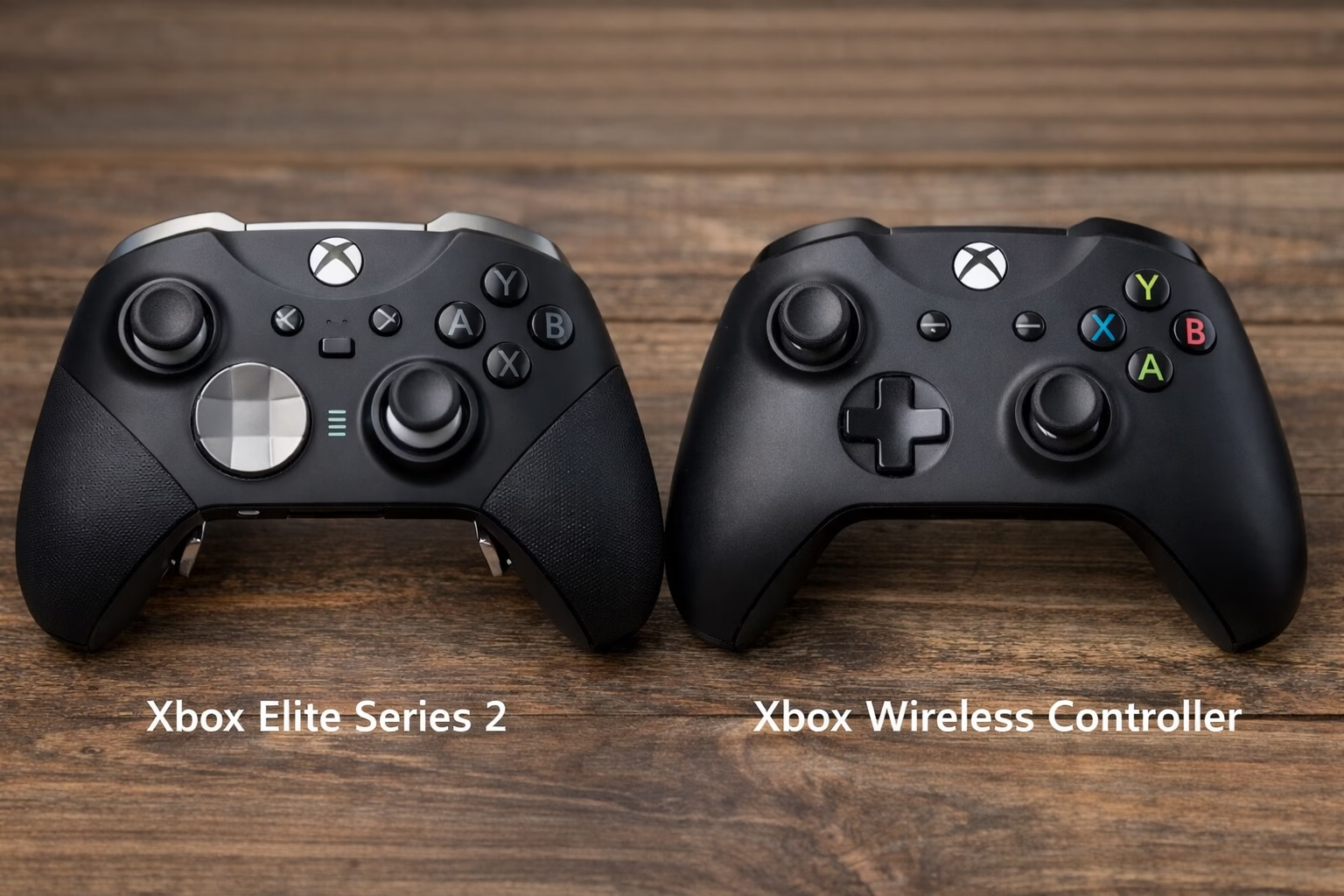
When we look at the Xbox Elite vs regular controller: what’s the difference in terms of philosophy, it comes down to versatility. The regular Xbox controller is designed for everyone. Whether you are a five-year-old playing Minecraft or an adult enjoying Forza, the standard controller fits comfortably in almost any hand. It is lightweight, durable, and uses AA batteries, making it the “old reliable” of the gaming world.
On the other hand, the Elite Series 2 is built for the “hardcore” enthusiast. It prioritizes performance over simplicity. Every button, stick, and trigger can be modified to suit a specific playstyle. While the standard controller is a static device, the Elite is a modular platform. If you find yourself asking Xbox Elite vs regular controller: what’s the difference, the answer starts with the intent: one is meant to play games, while the other is meant to win them.
Physical Build and Material Quality
The first thing you notice when picking up an Elite controller is the weight. Weighing in at approximately 345 grams, it is significantly heavier than the 280-gram standard model. For many, this weight translates to a “premium” feel. The Elite also features a wrap-around rubberized grip that stays tacky even when your hands get sweaty during a long session.
In contrast, the regular controller uses a textured plastic grip. While effective, it doesn’t offer the same level of security. Furthermore, the Elite uses metal components for the thumbstick shafts and the D-pad, whereas the standard model is almost entirely plastic. This material difference is a huge factor in the Xbox Elite vs regular controller: what’s the difference discussion, as the metal parts offer a smoother, more fluid motion that plastic simply cannot replicate.
The Game-Changer: Rear Paddles and Mapping
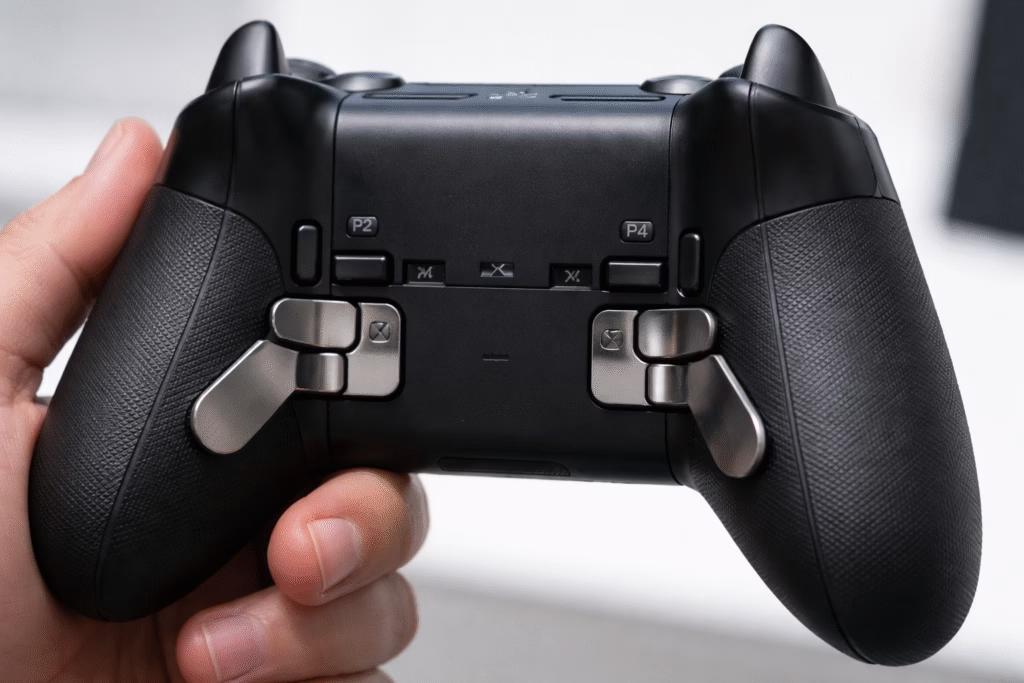
If there is one feature that defines the Xbox Elite vs regular controller: what’s the difference debate, it is the four stainless steel paddles on the back. These paddles allow you to map any face button (A, B, X, Y) to the rear of the controller. This means you can jump, reload, or swap weapons without ever taking your thumbs off the analog sticks.
For competitive shooters, this is a massive advantage. It allows for “Crouch-Shotting” or “Jump-Aiming” with ease. Even in casual games like Elden Ring, mapping the dodge button to a paddle feels more natural and responsive. The standard controller has no rear inputs, forcing you to use the “Claw” grip if you want to keep your thumbs on the sticks—a technique that can lead to hand strain over time.
Trigger Locks and Response Times
Speed is everything in gaming. The Elite Series 2 features three-stage hair trigger locks. By flipping a switch on the back, you can shorten the travel distance of the LT and RT buttons. At the shortest setting, the trigger behaves more like a mouse click than a traditional pull.
This is a vital distinction in the Xbox Elite vs regular controller: what’s the difference comparison. In a shooter, a shorter trigger pull means you fire your first shot milliseconds faster than your opponent. The regular controller has a deep, linear pull, which is great for racing games where you need to modulate gas and brakes, but it is a disadvantage in fast-paced combat.
To fully appreciate the precision of these triggers, many gamers pair their setup with a high-end display. Using a monitor like the ASUS ROG Swift 360Hz Gaming Monitor ensures that the millisecond advantages provided by your Elite controller are actually visible on screen, creating a seamless link between your fingers and the game’s engine.
Adjustable Thumbstick Tension Explained
One of the most underrated features of the Elite is the ability to adjust thumbstick tension. Using a small included tool, you can tighten or loosen the sticks. Higher tension provides more resistance, which can help with precision aiming in snipers. Lower tension allows for flick-shots and faster movement.
The standard controller has a fixed tension that is relatively loose. While this is fine for most games, it lacks the surgical precision some players crave. When analyzing Xbox Elite vs regular controller: what’s the difference, the inclusion of tension adjustment proves that the Elite is a tool tailored to the user’s specific muscle memory.
Battery Life and Charging Solutions
The power situation is another major fork in the road. The standard Xbox controller still uses two AA batteries. While some prefer this because they can swap in fresh batteries instantly, it can be a hassle and an ongoing expense.
The Elite Series 2 features an internal, rechargeable battery that boasts up to 40 hours of playtime on a single charge. It also comes with a sleek charging dock that can stay inside the carrying case. This means you can charge your controller while it is protected. In the Xbox Elite vs regular controller: what’s the difference battle, the convenience of the Elite’s charging ecosystem often wins over the “old school” battery approach of the regular model.
Software Customization via Xbox Accessories App
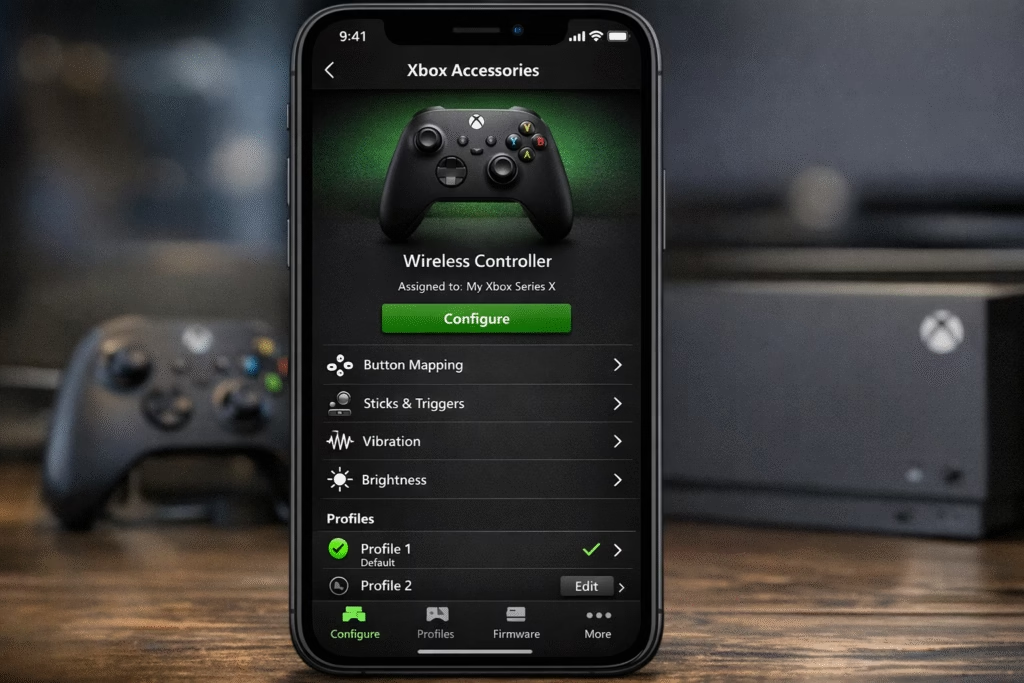
Both controllers work with the Xbox Accessories app, but the Elite unlocks a whole new world of software. You can save up to three custom profiles directly onto the controller and switch between them with a dedicated button.
You can adjust the brightness of the Xbox button, create “Shift” commands (where holding one paddle changes the function of every other button), and even customize the dead zones of your sticks. For the standard controller, you can only remap buttons at a basic level. This software depth is a key part of the Xbox Elite vs regular controller: what’s the difference experience, giving power users total control over their hardware.
Durability and Long-Term Reliability Concerns
It wouldn’t be a fair comparison of Xbox Elite vs regular controller: what’s the difference without mentioning reliability. Ironically, the standard controller is often cited as being more durable over long periods. Because it is simpler, there are fewer parts that can fail.
The Elite Series 2, despite its premium price, has faced criticism for “stick drift” and unresponsive bumpers (LB/RB) after heavy use. While Microsoft has improved the build quality in recent batches, the complexity of the Elite makes it more fragile than the basic plastic shell of the standard model. If you buy an Elite, it is highly recommended to get an extended warranty.
For players concerned about stick drift, moving toward a “Hall Effect” sensor setup is becoming popular. While the Elite doesn’t have these natively, using a high-end third-party alternative like the Turtle Beach Stealth Ultra can provide similar “pro” features with sensors that are immune to traditional stick drift, offering a different take on the premium controller market.
Xbox Elite Series 2 Core vs. Full Bundle
Lately, the Xbox Elite vs regular controller: what’s the difference question has become more complicated with the “Core” edition. The Core (usually white or red) is the exact same controller as the black Elite Series 2, but it doesn’t come with the paddles, extra sticks, or the carrying case.
This is a great mid-point for gamers who want the build quality and internal battery of the Elite but don’t want to pay $180 upfront. You can always buy the “Component Pack” later to add the paddles. It makes the “Elite” lifestyle more accessible without the sticker shock of the full bundle.
Frequently Asked Questions (FAQs)
1. Does the Elite controller work on PC?
Yes, both the Elite and regular controllers work perfectly on PC via USB-C, Bluetooth, or the Xbox Wireless Adapter.
2. Can I use the Elite paddles on a regular controller?
No, the regular controller does not have the internal sensors or the external slots required to use paddles.
3. Is the Elite Series 2 battery replaceable?
Not easily. It is an internal lithium-ion battery. If it fails, you generally have to send the controller in for repair.
4. Why is the Elite controller so heavy?
The extra weight comes from the internal battery, the magnets used for interchangeable parts, and the steel components.
5. Does the Elite controller reduce input lag?
While the polling rates are similar, the hair triggers and paddles reduce the “human input lag” by allowing you to react faster.
6. Which is better for racing games?
The regular controller is actually excellent for racing because of its long trigger travel, but the Elite is better if you map gear shifts to the rear paddles.
7. Can I use the Elite Series 2 on a PlayStation 5?
Not natively. You would need a third-party adapter, and even then, some features may not work correctly.
8. Is the Elite Series 2 Core better than the regular controller?
Yes, in terms of build and battery, but without the paddles, you are missing out on the biggest performance advantage.
9. How do I fix stick drift on an Elite controller?
You can try cleaning it with isopropyl alcohol or adjusting dead zones in the app, but severe drift usually requires a professional repair.
10. Is the Elite controller worth it for casual gamers?
If you value comfort and the rechargeable battery, yes. But for strictly casual play, the standard controller is a much better value.
Conclusion: Which Controller Should You Buy?
At the end of the day, the Xbox Elite vs regular controller: what’s the difference comes down to your budget and your competitive drive. If you are a casual gamer who plays a few hours a week, the standard Xbox controller is more than enough. It is reliable, comfortable, and iconic for a reason.
However, if you spend your weekends in ranked lobbies or if you find yourself frustrated by the limitations of the standard layout, the Elite Series 2 is a transformative experience. Once you get used to having your face buttons on the back paddles, going back to a regular controller feels like playing with one hand tied behind your back.
If you are ready to upgrade your entire gaming environment, consider investing in a premium seating solution as well. The GTPLAYER Gaming Chair provides the ergonomic support necessary to maintain the focus that a high-performance controller demands, ensuring that your body stays as comfortable as your thumbs are fast.